Email campaign tools: two-product comparison
Campaign Monitor vs Mailchimp: which one fits your list and your team
Short answer
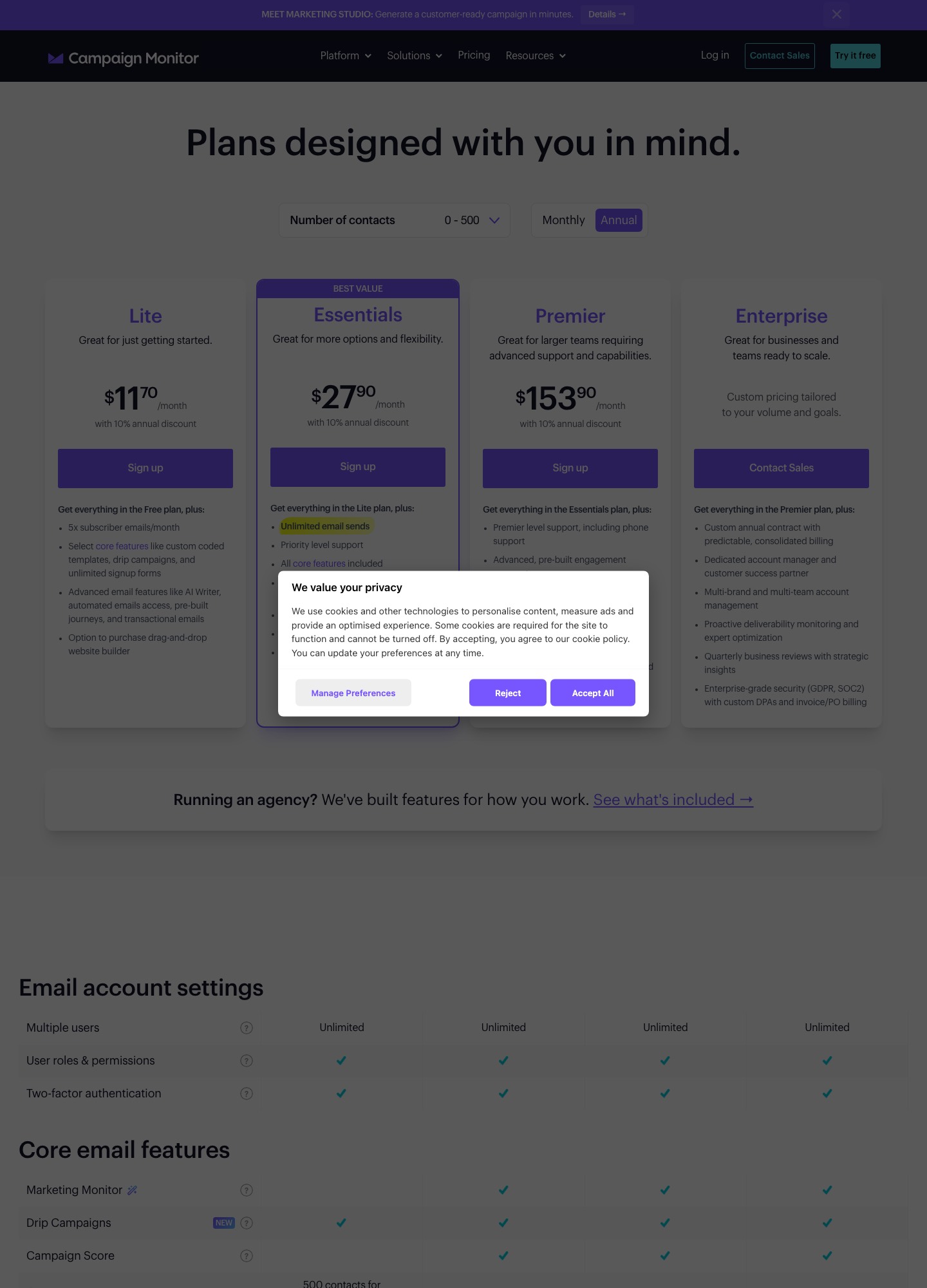
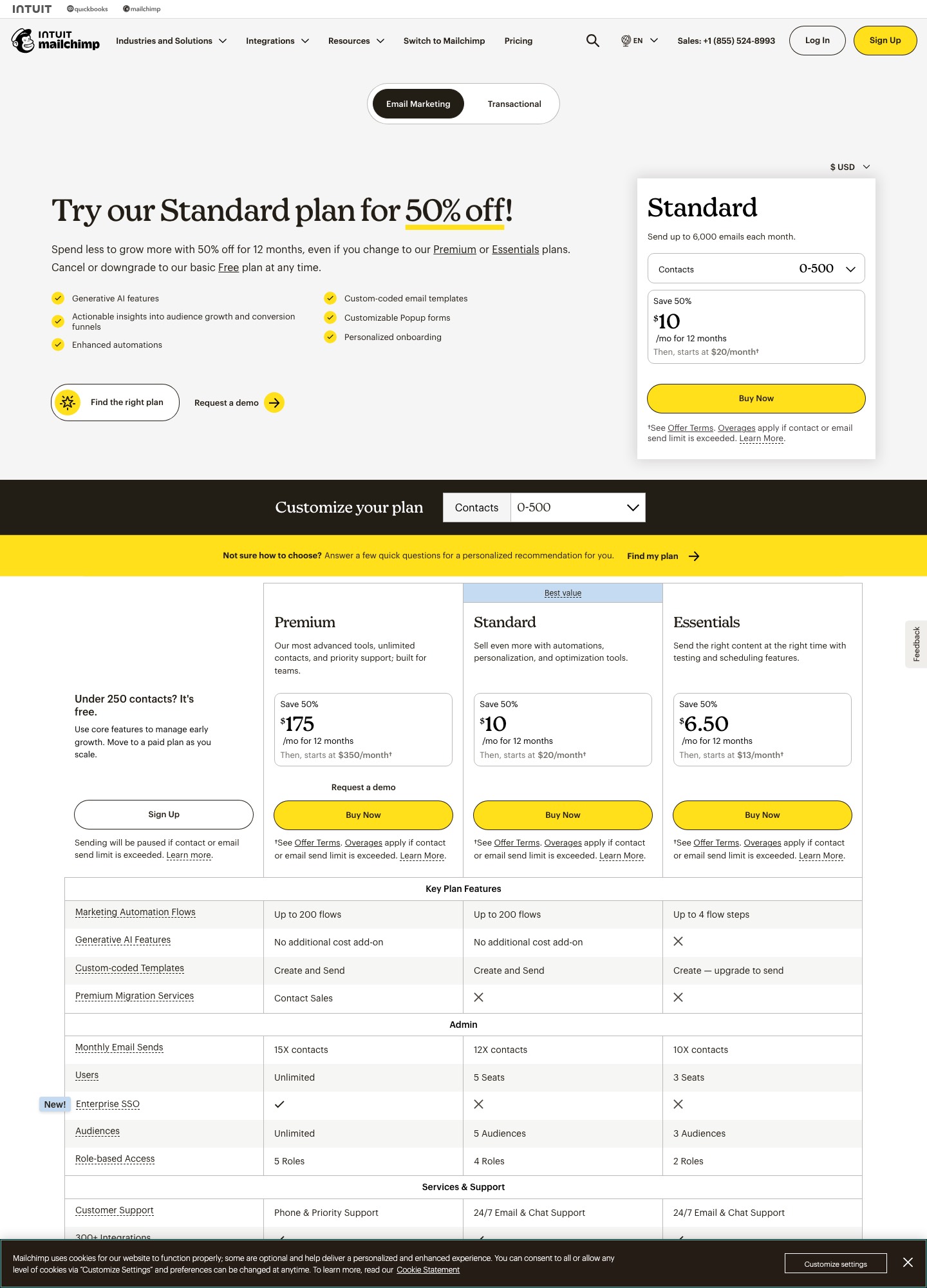
Campaign Monitor suits teams that care how an email is built and approved: its plan table lists "Multiple users" as Unlimited on every plan, and the pricing page carries a separate agency block with sub-accounts and private labeling. Mailchimp suits anyone who wants to start free or keep the first paid plan cheap. With the Annual toggle on and the selector at 0–500 contacts, Campaign Monitor's pricing page shows Lite at $11.70 a month, Essentials at $27.90 and Premier at $153.90. Mailchimp's pricing page starts Standard at $20 a month for 500 contacts and keeps a Free plan for up to 250 contacts and 500 sends a month.
The two price lists are not like for like. Campaign Monitor's figures already include a 10% annual discount, and its Lite plan caps sending at 5 emails per contact per month, where Mailchimp Standard allows 12. Prices checked 7 October 2026.
Plans and limits side by side
| Campaign Monitor | Mailchimp | |
|---|---|---|
| Plans | Lite, Essentials, Premier, plus custom-priced Enterprise | Free, Essentials, Standard, Premium |
| Free option | No ongoing free plan; a 30-day trial with 500 contacts and a 500-email limit | Free plan: 1 seat, 1 audience, up to 250 contacts, 500 sends a month (250 a day); a 14-day Standard trial is also offered |
| Price at the smallest band | Lite $11.70, Essentials $27.90, Premier $153.90 per month (Annual toggle, 0–500 contacts) | Standard from $20 per month (default 500-contact selector) |
| What the price assumes | A 10% annual discount is already inside each figure | A half-price introductory offer for 12 months was showing when we captured the page |
| Monthly send cap | Lite: 5× contacts (2,500 at 500 contacts). Essentials and Premier: unlimited | 10× contacts on Essentials, 12× on Standard (6,000 at 500 contacts), 15× on Premium |
| Users | "Multiple users": Unlimited on every plan | 3 seats on Essentials, 5 on Standard, unlimited on Premium |
| Automation | Automated emails and drip campaigns from Lite; Lite automated emails count against its send volume; unlimited on Essentials | Essentials flows have up to 4 steps; Standard and Premium allow up to 200 steps per flow, with multiple branching points |
| Custom-coded templates | Import your own HTML from Lite upward | Essentials can create them but must upgrade to send; Standard and Premium create and send |
| Support | 24/7 AI support agent on all plans; priority-level support on Essentials; phone on Premier | 24/7 email and chat on Essentials and Standard; phone and priority support on Premium |
| Integrations | 250+ (Salesforce, WordPress and Google Analytics among them) | 300+ on its pricing page, including Shopify, WooCommerce, Canva, Zapier, Square and Wix |
Sources: Campaign Monitor pricing, Mailchimp pricing and Mailchimp marketing plans, read on 7 October 2026. Campaign Monitor's page sets bigger contact bands from a dropdown and we read only the 0–500 band, so every Campaign Monitor price on this page is a 500-contact, annual-billing figure.
What a 500-contact list costs over twelve months
500 contacts is the one list size both vendors price in public, so it is the fairest place to multiply out. Campaign Monitor's monthly figures come from annual billing; Mailchimp's $20 is the regular Standard rate.
| Plan | Price per month | Twelve months | Sends allowed per month at 500 contacts |
|---|---|---|---|
| Campaign Monitor Lite | $11.70 | $140.40 | 2,500 |
| Campaign Monitor Essentials | $27.90 | $334.80 | Unlimited |
| Campaign Monitor Premier | $153.90 | $1,846.80 | Unlimited |
| Mailchimp Free (up to 250 contacts) | $0 | $0 | 500, and no more than 250 a day |
| Mailchimp Standard | $20 | $240 | 6,000 |
Lite looks like the bargain: $140.40 against $240 is $99.60 less over the year. The catch is the cap. A weekly newsletter goes out 52 times a year, about 4.3 sends a month, which is roughly 2,170 emails to 500 people and fits inside Lite's 2,500. Mail twice a week and the same list needs about 4,330 emails a month, so Lite stops short. Stepping up to Essentials adds $16.20 a month ($27.90 minus $11.70), or $194.40 over a year, and lands Campaign Monitor at $334.80, above Mailchimp Standard's $240. Essentials is the like-for-like rival to Standard once you mail more than weekly.
Mailchimp Standard's 6,000 sends at 500 contacts works out to 12 emails per person, about 2.8 a week. The Free plan fits a very small list exactly: 250 contacts mailed twice a month is 500 sends, which is the plan's whole monthly allowance.
Pricing as the list grows
Mailchimp publishes a Standard price for each contact band, so its growth curve is easy to forecast. Campaign Monitor keeps everything above 500 contacts behind its dropdown, and we did not read it. Choose your own list size on its pricing page and read the three plan figures there before you decide. What can be set out today is Mailchimp's side:
| Contacts | Mailchimp Standard per month | Twelve months | Send ceiling at 12× the band's top |
|---|---|---|---|
| 500 | $20 | $240 | 6,000 |
| 2,501–5,000 | $100 | $1,200 | 60,000 |
| 5,001–10,000 | $135 | $1,620 | 120,000 |
| 10,001–15,000 | $230 | $2,760 | 180,000 |
| 20,001–25,000 | $310 | $3,720 | 300,000 |
The step from $20 to $100 between the entry band and 2,501–5,000 contacts is the number to plan around, not the headline $20. Mailchimp's marketing plans page also shows a half-price offer for the first twelve months of each band; it lapses, so budget the regular rate from month 13. On the send side, a 5,000-contact list mailed every day needs 150,000 sends a month (5,000 × 30), which is 90,000 more than Standard allows at that band. Campaign Monitor Essentials and Premier advertise unlimited sends, so the count does not bind there. Lite would allow only 25,000 at that size (5 × 5,000).
What happens when you pass a limit
The two vendors handle it differently. The note under Mailchimp's Free sign-up button says sending is paused if the contact or email limit is exceeded. Paid Mailchimp plans keep sending and apply overage charges, and the pricing page refers to its additional-charges help page for the rates, which we did not read; look there before you plan on going past 12 sends per contact. Campaign Monitor says that if you send above your limits or your list grows, it notifies you and gives you the choice to upgrade or pay for the extra emails. Since only Lite carries a send cap, that choice lands mostly on Lite accounts, where the way up is Essentials.
Automation: where each plan draws the line
Both vendors let you build automated emails on a low paid plan, then ration them differently. Campaign Monitor's Lite plan includes drip campaigns, automated emails, pre-built journeys and transactional emails, but the pricing page marks Lite's automated emails as limited to its email send volume, which at 500 contacts is the 2,500 monthly cap. Essentials lists unlimited automated emails. A welcome series that sends three emails to each of 100 new subscribers a month spends 300 of Lite's 2,500, so on a small list it is the newsletter, not the automation, that eats the allowance.
Mailchimp rations by flow size. On its Essentials plan a flow can have up to 4 steps; Standard and Premium allow up to 200 steps per flow, with multiple branching points. A short path of up to four steps fits Essentials, but a longer one, or one with several branches, means moving to Standard at $20. Premium and Standard are listed with the same flow allowance, so the extra Premium money goes to seats, support and send ceiling, not to more automation capacity.
Editor, templates and pre-send checks
Campaign Monitor's pricing page lists a drag-and-drop builder, more than 100 customizable responsive templates, uploads of your own coded HTML and "branded templates" that pull your colors and logo in from a URL, all among the core features available from Lite. The checking tools sit higher: inbox preview arrives with Essentials, and the page describes design and spam testing, link review and a non-human click filter on the advanced-features list. Premier adds email section locking, which lets you decide who may edit which part of a template, plus template management for teams and advanced link tracking. That combination is what makes Campaign Monitor sensible for an agency or a brand team where a designer builds the shell and others fill in the copy.
Mailchimp's gate is narrower and more specific: custom-coded templates. Essentials can create them but has to upgrade before it can send one; Standard and Premium both create and send. If your designer hands over HTML, Mailchimp Standard is the first plan on which you can actually mail it, while Campaign Monitor lists coded-template import on Lite.
Seats, agencies and support
Seat limits are where the two diverge most for teams. Campaign Monitor's plan table shows "Multiple users" as Unlimited on every plan, with roles and permissions and two-factor authentication on each. Mailchimp counts seats: 3 on Essentials, 5 on Standard, unlimited only on Premium (and its Free plan has one). Audiences are capped the same way, at 3, 5 and unlimited. A five-person marketing team with a separate list per brand fits Mailchimp Standard only if it keeps to 5 audiences and 5 seats; Campaign Monitor shows no seat ceiling at any price.
Agency work is the clearest case. Campaign Monitor's page has a dedicated agency feature block: sub-accounts under one admin account, a client dashboard, private labeling, a markup option, in-app billing for clients, and template and automation sharing across sub-accounts. We found no equivalent block on Mailchimp's pricing page. On support, Campaign Monitor puts phone access on Premier ($153.90 at 500 contacts) and an AI support agent on every plan; Mailchimp reaches phone support on Premium, with 24/7 email and chat on Essentials and Standard.
Free plan versus free trial
Mailchimp's Free plan has no time limit but a hard ceiling: 250 contacts, 500 sends a month, 250 a day, one audience and one seat. Campaign Monitor offers a 30-day trial instead, with 500 contacts and a 500-email limit. Those two numbers interact. One campaign to a full 500-person list uses the entire trial allowance, so test with a segment of 50 or 100 people if you want to try more than one send before the 30 days are up.
Choose Campaign Monitor if…
- more than five people, or several brands or clients, need their own logins: the plan table shows "Multiple users" as Unlimited on every plan, and Premier locks template sections so only the right person edits them;
- you run an agency and want sub-accounts, private labeling and client billing from one admin account;
- you mail a 500-person list more than weekly and would rather pay $27.90 for uncapped sending on Essentials than count sends against a ceiling;
- your designer delivers finished HTML and you want to send it from the entry plan.
Choose Mailchimp if…
- your list is under 250 people and goes out about twice a month, which the Free plan covers at no cost;
- you want the cheapest plan that both sends custom-coded templates and builds flows of up to 200 steps: Standard from $20 a month;
- you depend on a connector from its list, such as Shopify, WooCommerce, Canva, Square or Wix;
- five seats and five audiences are enough for the team you have.
Neither tool is shaped for email triggered by what people do inside a software product, such as a trial ending or a plan change. For that job, Loops' pricing page shows a free plan, $99 a month at about 10,000 contacts and $249 a month at about 50,000; our Customer.io vs Loops comparison covers the trade-off. If you are still choosing between campaign tools, Mailchimp alternatives, Campaign Monitor alternatives and the small-team shortlist widen the field, and MailerLite vs Mailchimp and Moosend vs Mailchimp put Mailchimp against two cheaper rivals.
Moving from one to the other
Going from Mailchimp to Campaign Monitor, export each audience as a CSV and merge them into one deduplicated file before importing, because the contact band you pay for is set by the size of what you load. Campaign Monitor's trial is capped at 500 contacts, so test with a slice of the list and pick a paid band before importing the rest. Coded templates can be uploaded as HTML, but rebuild automations by hand in Campaign Monitor's journeys and check each one against Lite's send-volume limit if you start on that plan. Authenticate your sending domain in the new account before the first real send.
Going the other way, count what you will lose. Campaign Monitor's "Unlimited" multiple users and agency sub-accounts have no counterpart on Mailchimp's lower plans, where Standard stops at 5 seats and 5 audiences, so a team of six or a set of client accounts means Premium. Mailchimp's pricing page also lists migration services on Premium through its sales team, while Standard and Essentials show none. Whichever direction you move, keep the old account active for a send or two so you can compare how the new one performs before cancelling.
FAQ
Is Campaign Monitor cheaper than Mailchimp?
At the smallest band, Campaign Monitor Lite ($11.70 a month on annual billing) undercuts Mailchimp Standard ($20), but Lite allows 2,500 sends at 500 contacts against Mailchimp's 6,000. Campaign Monitor Essentials, at $27.90, is dearer than Mailchimp Standard and has no send cap. Above 500 contacts only Mailchimp's band prices are public, so read Campaign Monitor's figures from its contact dropdown.
Does Campaign Monitor have a free plan?
No. It gives you a 30-day trial limited to 500 contacts and 500 emails. Mailchimp's Free plan has no expiry but stops at 250 contacts and 500 sends a month, with sending paused if you go over.
Which has stronger automation, Campaign Monitor or Mailchimp?
On the plan pages, Mailchimp Standard allows up to 200 steps per flow from $20 a month, while Mailchimp Essentials limits a flow to 4 steps. Campaign Monitor lists unlimited automated emails on Essentials, and on Lite they count against the monthly send cap. Choose by how many branches you need and how many sends the automations will add on top of your newsletters.
Which is better for an agency managing client accounts?
Campaign Monitor, going by what each pricing page lists. It describes sub-accounts, a client dashboard, private labeling, markup billing and shared templates, and its plan table shows "Multiple users" as Unlimited on every plan. Mailchimp's seats are 3, 5 and unlimited by plan, and we found no agency block on its pricing page.
Can I send my own coded HTML in both tools?
Yes, but at different points. Campaign Monitor lists custom-coded templates in its core features from Lite. Mailchimp lets Essentials create them but requires Standard or Premium before you can send one.