Small-business email: two-product comparison
Mailchimp vs Constant Contact for small-business email
Short answer
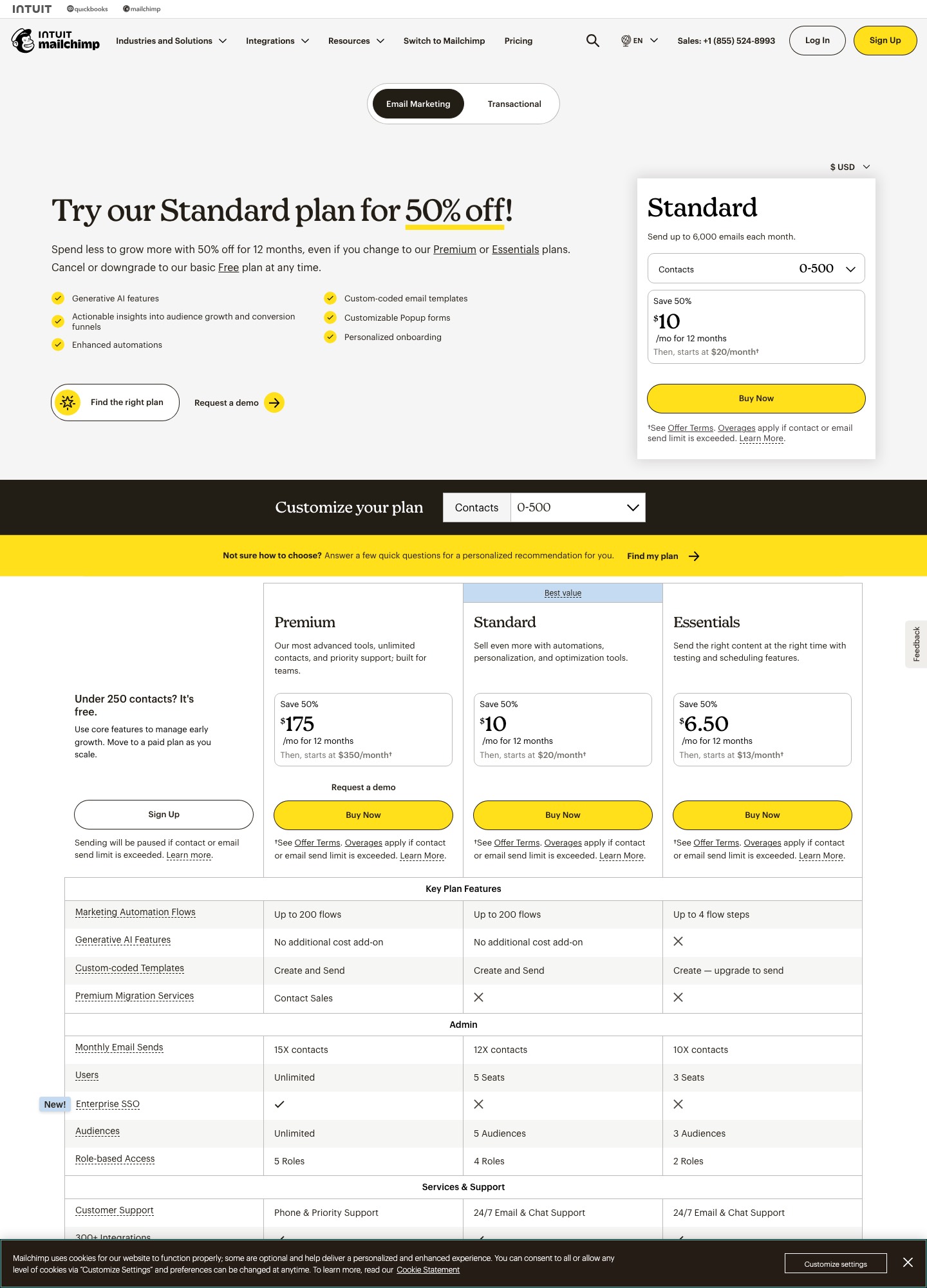
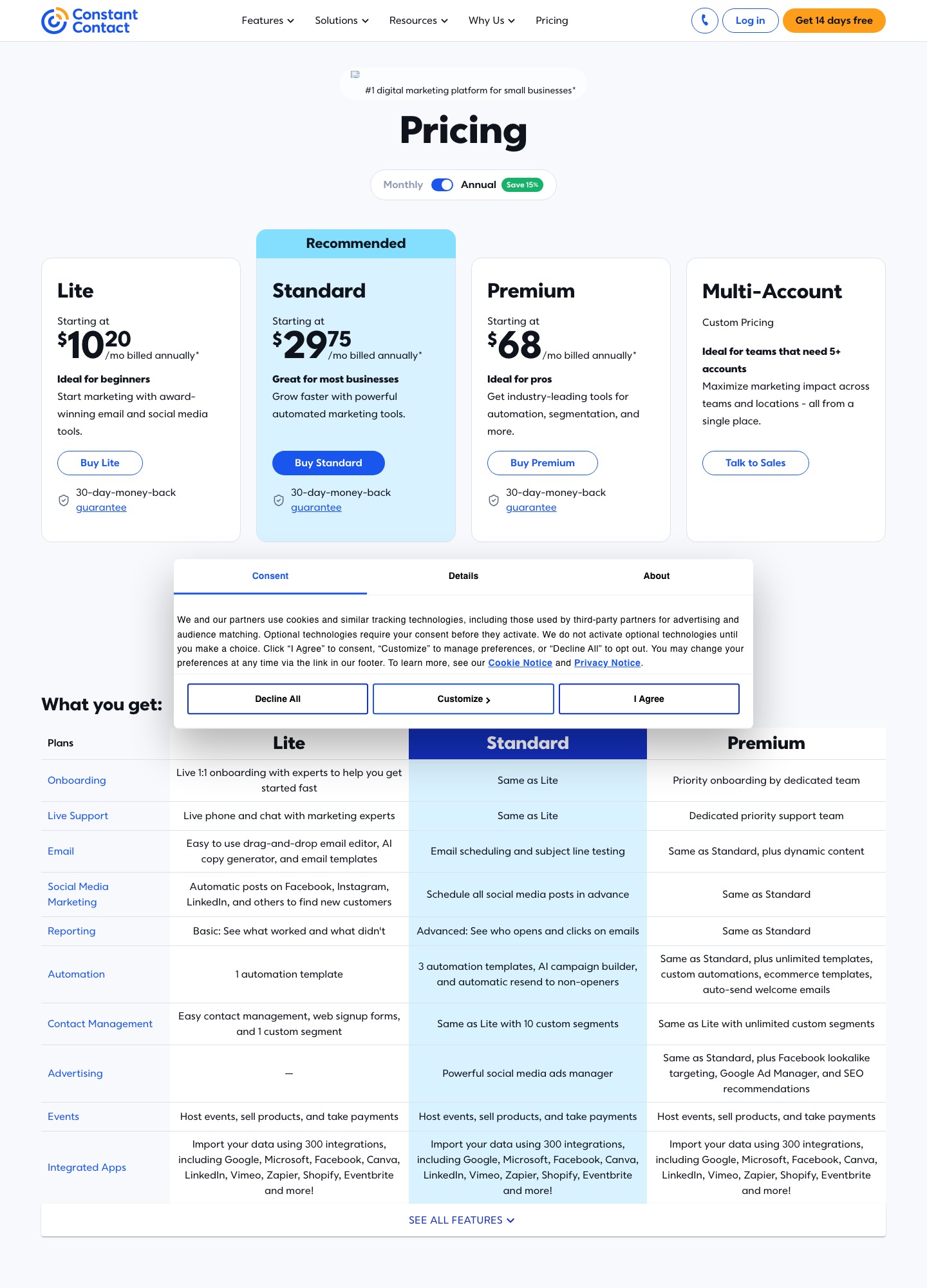
Mailchimp is cheaper to start and lets you build custom multi-step automations on its middle plan; Constant Contact costs more at the same tier but includes live phone and chat support on every plan. At Mailchimp's default 500-contact selector, Standard lists $20 a month, and it keeps a free plan for up to 250 contacts. Constant Contact has no free plan, and its Standard plan starts at $35 a month ($29.75 prepaid for a year).
Pick Mailchimp if you want flows and branching before the top tier. Pick Constant Contact if the person sending is not technical and wants a phone number to call. Prices checked 7 October 2026.
Plans and prices side by side
| Mailchimp | Constant Contact | |
|---|---|---|
| Plans | Free, Essentials, Standard, Premium | Lite, Standard, Premium; Multi-Account by quote for 5+ accounts |
| Free option | Free plan: 250 contacts, 500 sends a month (250 a day), 1 seat, 1 audience | No free plan; free trial without a credit card and a 30-day money-back guarantee |
| Entry prices | Standard from $20/month at 500 contacts | Lite from $12, Standard from $35, Premium from $80 per month |
| Prepay or intro offer | Introductory discount on the first 12 months (50% off when we captured the page) | Prepay 12 months for up to 15% off: Lite $10.20, Standard $29.75, Premium $68 |
| Monthly send cap | 10× contacts on Essentials, 12× on Standard, 15× on Premium | 10× contacts on Lite, 12× on Standard, 24× on Premium |
| Users | 1 on Free, 3 on Essentials, 5 on Standard, unlimited on Premium | 1 on Lite, 3 on Standard, unlimited on Premium |
| Support | Email for 30 days on Free; 24/7 email and chat on Essentials and Standard; phone on Premium | Live phone and chat on every plan; dedicated priority team on Premium |
Sources: Mailchimp pricing, Mailchimp marketing plans and Constant Contact pricing, read on 7 October 2026. Both vendors price by contact count, so the entry figures above apply to each vendor's smallest band.
What Mailchimp Standard costs as the list grows
Mailchimp publishes a price for each contact band, which makes it easy to forecast. Constant Contact's pricing page shows "starting at" figures for its smallest band and calculates larger lists from its contact selector, so we have no verified Constant Contact figure above that entry band; run your own list size through its selector before you decide.
| Contacts | Mailchimp Standard, regular price | First 12 months with the intro offer shown | Mailchimp's monthly send cap (12×) |
|---|---|---|---|
| 500 | $20 | $10 | 6,000 |
| 2,501–5,000 | $100 | $50 | up to 60,000 |
| 5,001–10,000 | $135 | $67.50 | up to 120,000 |
| 10,001–15,000 | $230 | $115 | up to 180,000 |
| 20,001–25,000 | $310 | $155 | up to 300,000 |
Two things to notice. First, the regular price rises fivefold between the 500-contact entry point ($20) and a list of 2,501–5,000 ($100), so the headline "$20" says little about a growing list. Second, the introductory discount covers only the first year; budget the regular price from month 13. Mailchimp also counts a person once for every audience they sit in, so a contact on two audiences uses two of your contact slots.
Send limits and what an overage costs
Standard on both tools allows 12 sends per contact per month. With 5,000 contacts that is 60,000 sends. A weekly newsletter (about 4.3 sends a month) uses roughly 21,500 of them, a twice-weekly one about 43,000, and a daily one 150,000. The daily sender is 90,000 over the cap.
Constant Contact does not stop the mail; it bills $0.002 for each send past the allowance, or $2 per 1,000. Ninety thousand extra sends would add $180 to that month's bill. Mailchimp's pricing page says only that overage charges apply, and refers to a separate help page for the rates, so check it before planning a high-frequency program. On either tool, sending more often to a smaller engaged segment keeps you under the cap and is usually kinder to deliverability.
Automation: where the two split most
Constant Contact ties automation to its plan tier. Lite has one automation template, Standard has three plus an AI campaign builder and automatic resend to non-openers, and only Premium ($80 a month and up) offers unlimited custom automations and an auto-send welcome email. A small shop that wants a three-email welcome series, a birthday message and a win-back will outgrow Standard.
Mailchimp lets you build your own flows from the first paid tier, but the depth is gated: Essentials flows are capped at 4 steps, while Standard and Premium lift that cap well beyond what a small program needs and add several branch points. If branching on clicks or purchases is part of your plan, Mailchimp Standard at $20 reaches further than Constant Contact Standard at $35, and reaches what only Constant Contact Premium offers.
Segments, seats and who else can log in
Constant Contact caps custom segments by plan: 1 on Lite, 10 on Standard, unlimited on Premium. The Mailchimp pricing page we read states no segment cap, but it does limit audiences: 1 on Free, 3 on Essentials, 5 on Standard, unlimited on Premium. A business with a retail list, a wholesale list and a donor list will feel Mailchimp's audience limit; one that cuts a single list many ways will feel Constant Contact's segment limit.
Seats follow a similar pattern. If a volunteer, an assistant and the owner all need to send, that is three users: Constant Contact Standard covers it, and so does Mailchimp Essentials. Five or more people rules out Constant Contact below Premium.
Free plan versus free trial
Mailchimp's free plan is real but small. It stops at 250 contacts, sends at most 500 emails a month and 250 a day, offers only a limited set of templates, has no email scheduling, and leaves Mailchimp's branding on your emails and signup forms. Sending is paused if you pass a limit. Constant Contact offers no permanent free tier, only a trial and a 30-day refund window, so a hobby list under 250 people is the one case where Mailchimp is simply free and Constant Contact is not.
SMS, nonprofits and onboarding
Constant Contact Premium includes 500 text messages a month, and Lite or Standard can add SMS from $10 a month for up to 500 messages, for US paid customers. Mailchimp treats SMS as an add-on to any paid plan in selected countries, applied for in advance (approval typically takes 2–5 business days). Registered nonprofits get 15% off at Mailchimp on request; Constant Contact gives 20% for prepaying six months or 30% for prepaying twelve, after you send proof of your status. For getting started, Mailchimp includes one onboarding consultation on Standard in the first 90 days, and a dedicated specialist on Premium.
Year one is not year two at Mailchimp
The introductory offer makes Mailchimp's first twelve months look half as expensive as they will be. Using the Standard prices above, here is what a year costs at three list sizes, first with the intro offer and then at the regular rate that applies afterwards:
| Contacts | Year 1 (offer × 12) | Year 2 (regular × 12) | Increase |
|---|---|---|---|
| 2,501–5,000 | $50 × 12 = $600 | $100 × 12 = $1,200 | +$600 |
| 10,001–15,000 | $115 × 12 = $1,380 | $230 × 12 = $2,760 | +$1,380 |
| 20,001–25,000 | $155 × 12 = $1,860 | $310 × 12 = $3,720 | +$1,860 |
Those are for a list that stays in its band. Lists that grow move up a band as well, so a growing business should price the second year at the next band. Constant Contact's equivalent lever is the prepay discount of up to 15%, which lowers the price for as long as you keep prepaying rather than for one introductory year.
Templates, dynamic content and reporting by plan
Constant Contact includes a drag-and-drop editor and templates on every plan, and Mailchimp offers 100+ customizable templates, with the free plan limited to a subset. The differences show up in how much of the design and personalization work each plan lets you do. On Mailchimp, custom-coded HTML templates can be created on any plan, but only Standard and Premium can send them. Branded templates that apply your logo and colors automatically, custom reports and dynamic content, which swaps blocks of one email for different segments, all start on Standard. On Constant Contact, dynamic content waits for Premium, at $80 a month and up.
Reporting is similar. Constant Contact Lite shows basic results (what worked and what did not), Standard adds who opened and clicked, and Premium adds revenue reporting. Mailchimp's custom reports start on Standard. If you want to show a board or a client a report built around the numbers you choose, Mailchimp reaches that at $20 while Constant Contact reaches revenue reporting only at Premium.
What each vendor claims about reaching the inbox
Constant Contact's pricing page advertises a 98% inbox rate and footnotes it to 2025 Validity Everest qualified-inbox test results. That is the vendor's own claim, and we have not tested it. Mailchimp's pricing page makes no comparable claim that we found. Whichever you pick, the share of your mail that reaches the inbox depends mostly on your own sending domain being authenticated, on how engaged your list is and on how often you mail people who stopped reading, so treat any vendor percentage as a ceiling under good conditions rather than a promise.
Choose Mailchimp if…
- your list is under 250 people today and you want to start free;
- you need custom, branching automations without paying for a top tier;
- you expect to connect Shopify, WordPress, Canva or other apps from its integrations library;
- you are comfortable with email and chat support rather than a phone line.
Choose Constant Contact if…
- whoever sends the newsletter wants to call someone when something breaks, on any plan;
- your program is mostly regular broadcasts, event invitations and a short welcome email;
- you need scheduling, subject-line testing and 10 segments, and Standard's three automation templates are enough;
- you are a nonprofit that can prepay a year for 30% off.
Switching between them
Moving from Mailchimp to Constant Contact, export every audience, merge them and remove duplicates before importing, otherwise the contact count you pay on will include people twice. Rebuild automations by hand; a Mailchimp flow with 20 branching steps will not fit in the three templates on Constant Contact Standard, which is the usual reason such accounts end up on Premium.
Moving the other way, recreate Constant Contact's custom segments as Mailchimp segments and remember the audience limit if you keep separate lists. Mailchimp's pricing page also lists a partner-led migration service for Premium customers; ask its sales team if you have a large list. On either route, keep the old account for a few sends so you can compare delivery before cancelling.
FAQ
Which is cheaper, Mailchimp or Constant Contact?
At each vendor's smallest band, Mailchimp. Its Standard plan starts at $20 a month against $35 for Constant Contact Standard. Above that we can verify only Mailchimp's band prices, so use Constant Contact's contact selector for a like-for-like quote at your list size.
Does Constant Contact have a free plan?
No. It offers a free trial with no credit card and a 30-day money-back guarantee on paid plans. Mailchimp is the one with a free plan, limited to 250 contacts and 500 sends a month.
Which is better for a small business newsletter?
For one weekly newsletter either works. Mailchimp costs less at small sizes and scales to custom automation sooner; Constant Contact is easier to staff if you value phone support and a more guided setup.
What happens if I go over my send limit?
Constant Contact keeps sending and bills $0.002 per extra send. Mailchimp applies overage charges under rules on its help center, and on the Free plan sending simply pauses.
Related reading: MailerLite vs Mailchimp, Moosend vs Mailchimp, Campaign Monitor vs Mailchimp, the small-team shortlist and the alternatives hub.