Customer.io vs Drip: which one for event-driven email?
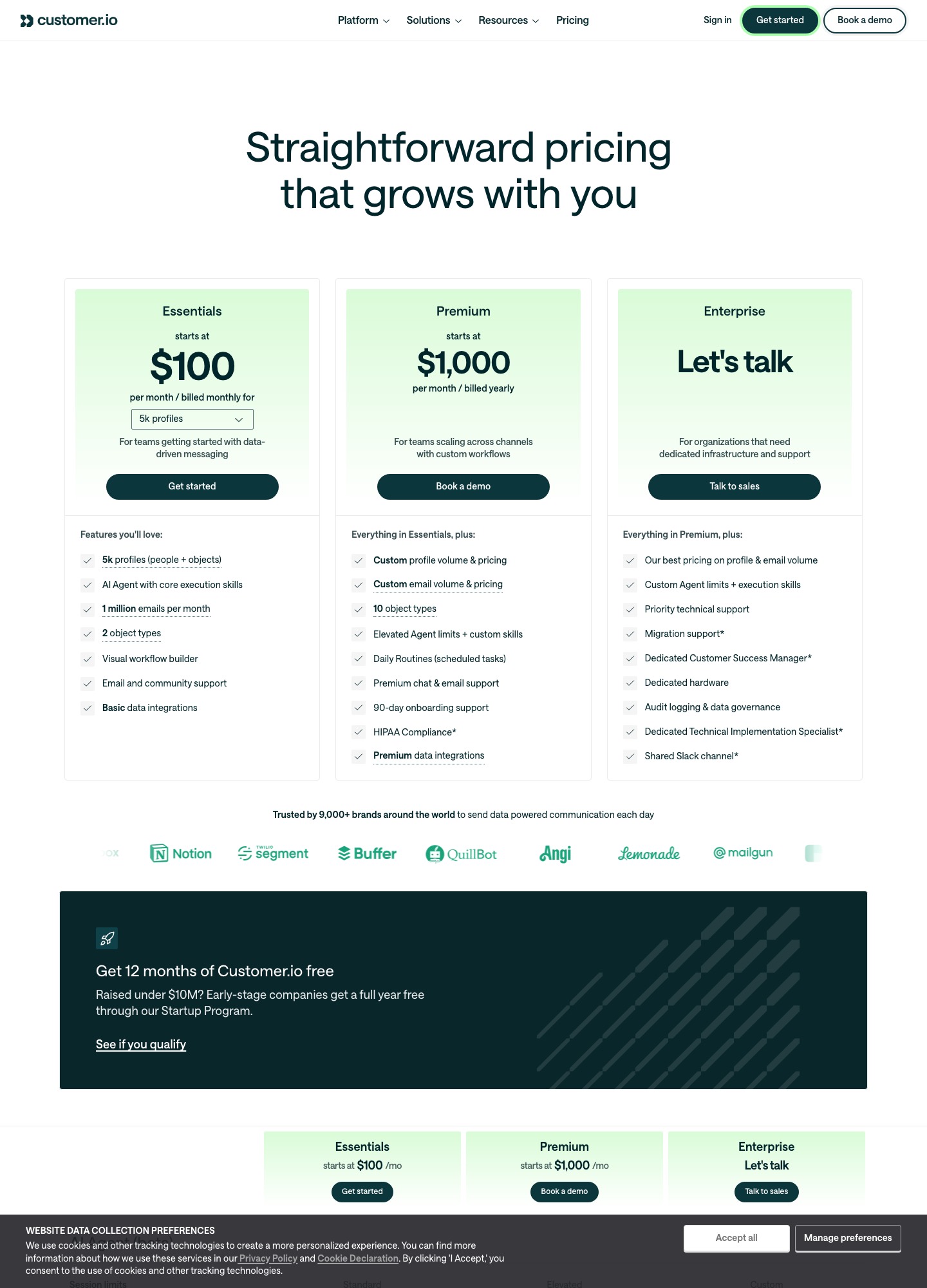
Customer.io Essentials is $100 at 5k profiles and Drip is $89 at 5,000 people. See where the price lines cross, what each one counts and who should pick which.
Short answer
Drip is the cheaper of the two at 5,000 people ($89 a month against Customer.io's $100), and Customer.io is cheaper from about 10,000 people upward: $145 against $154 at 10,000, $235 against $289 at 20,000 and $505 or more against $699 at 50,000. Pick Customer.io when your messages are triggered by what happens inside a product and you may add push, in-app or WhatsApp later. Pick Drip when revenue attribution, store integrations and a 14-day trial matter more than channel breadth. Prices were read from Customer.io's pricing page and Drip's pricing page on 7 October 2026.
Price at six list sizes
| List size | Customer.io Essentials (profiles) | Drip (people) | Cheaper by, per month | Gap over 12 months |
|---|---|---|---|---|
| 5,000 | $100 | $89 | Drip, $11 | $132 |
| 10,000 | $145 | $154 | Customer.io, $9 | $108 |
| 20,000 | $235 | $289 | Customer.io, $54 | $648 |
| 30,000 | $325 | $449 | Customer.io, $124 | $1,488 |
| 40,000 | $415 | $609 | Customer.io, $194 | $2,328 |
| 50,000 | $505+ | $699 | Customer.io, $194 or less | $2,328 or less |
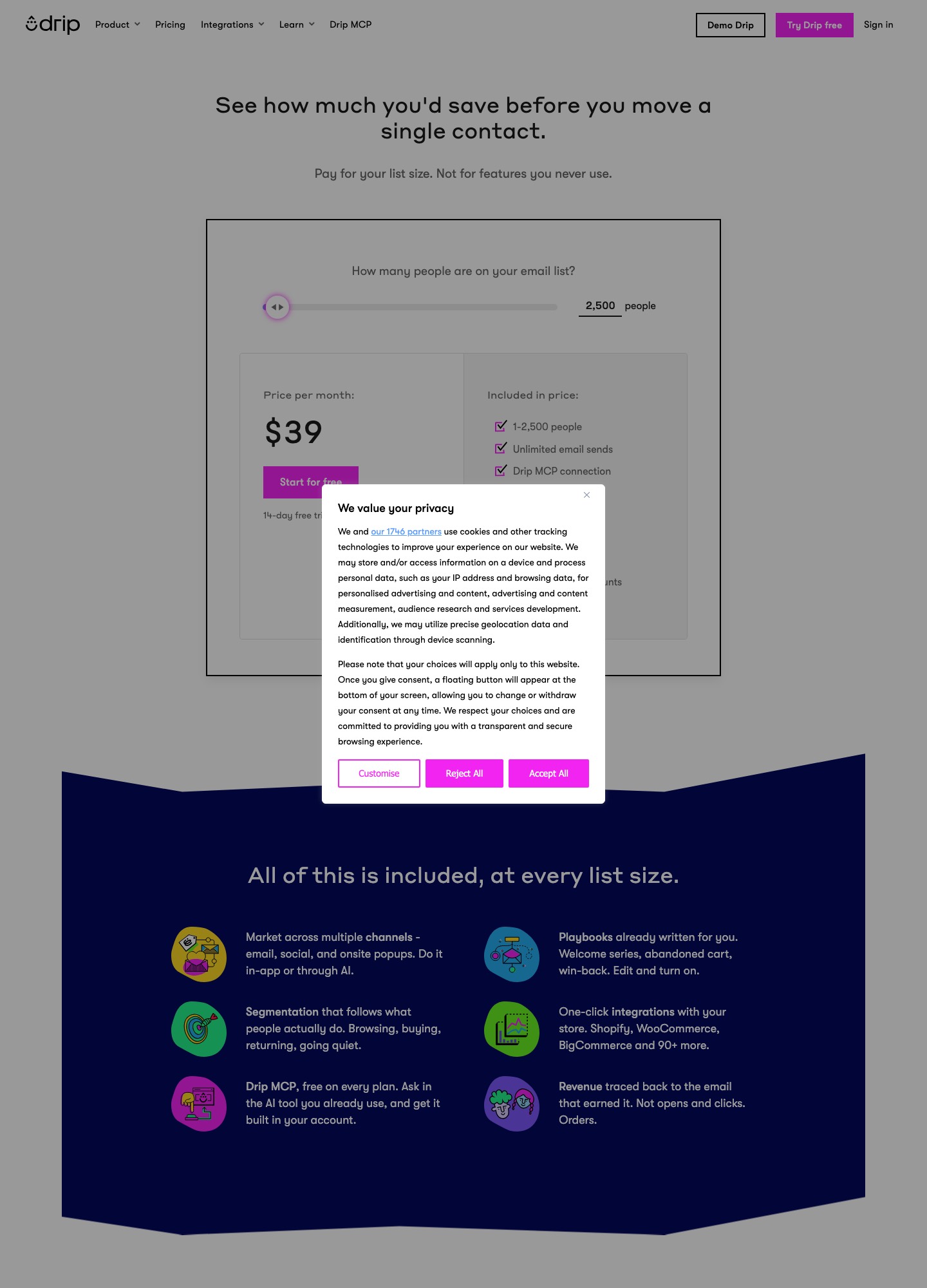
Both vendors set the price with a slider, and every figure above is a slider position we read on 7 October 2026. Customer.io's figures are Essentials billed monthly; its page shows the 50,000 position as "$505+". Drip's page showed $39 at 2,500 people and $49 at 3,000; Customer.io's Essentials starts at $100 for 5,000 profiles, and we did not read a lower option. Sizes between the ones listed were not read, so the crossover sits somewhere between 5,000 and 10,000 and this page does not pin it down.
What each one counts
Customer.io bills by profiles, and its card says "5k profiles (people + objects)". An object is something other than a person, such as a company or a workspace, and Essentials lists two object types where Premium lists ten. Beyond the plan size, the page prices additional profiles at $0.009 each: 10,000 profiles is $100 plus 5,000 × $0.009 = $45, which gives the $145 shown, and 50,000 is $100 plus 45,000 × $0.009 = $505. Customer.io's billing documentation adds a catch: a profile that exists at any point in the billing period counts toward that month's bill, even if you delete it. Clearing out a stale import therefore lowers next month's bill, not this one.
Drip says its price is "based on the number of active people in your account and the volume of emails you send during the month". We did not read how Drip defines "active", so confirm that before you import an old list. Drip also attaches a send allowance to the larger sizes: its page shows 480,000 email sends at 40,000 people and 600,000 at 50,000, which is 12 sends per person per month. A store that mails 40,000 people every day would send about 1.2 million messages in a 30-day month and land far outside that figure, while a weekly cadence, around 160,000, sits well inside it. The smaller sizes read "unlimited email sends".
What the entry plans include
Customer.io's Essentials card lists an AI agent with core execution skills, the visual workflow builder, email and community support, basic data integrations, one million emails a month and two object types. Extra emails cost $0.12 per 1,000. Transactional email is included on every plan. The comparison table marks managed deliverability as not included on Essentials, so anyone planning a high-volume sender should note that. Premium starts at $1,000 a month billed yearly, with custom profile and email volume, ten object types, HIPAA compliance and 90-day onboarding support. Separately, companies that have raised under $10 million can get 12 months free through the Startup Program, which can outweigh every difference in this article for the first year.
Drip's page offers a 14-day free trial with no credit card. Its feature list names behaviour-based automations, dynamic segmentation, onsite pop-ups and ecommerce revenue attribution, and it shows up to 50 workflows at the sizes we read. Chat and email support appears at the 10,000-person position, free migration and personalised onboarding at 25,000, and at 50,000 the button changes from a sign-up to "Book a demo". Its listed integrations are Shopify, WooCommerce, BigCommerce, Stripe, Typeform and Zapier.
Channels and fit
Customer.io's page lists email, push, in-app messaging and WhatsApp, with SMS volume custom on the displayed plans. That matters when a message should start as an in-app prompt and fall back to email if the user never opens the app. Drip sells email and SMS (the cost depends on subscribers and message segments) plus onsite pop-ups, so it covers a shop's list-growth and cart-recovery work without a mobile-app layer. If your product has no app and your revenue arrives through checkout, the extra channels in Customer.io are capacity you pay for and do not use.
A concrete B2B case: a product with 3,000 users and 800 customer accounts tracked as objects has 3,800 profiles, inside the 5,000 Essentials covers. Grow it to 4,200 users and 1,500 accounts and the total is 5,700 profiles. At the page's $0.009 rate, the 700 profiles above 5,000 would add $6.30, giving $106.30; confirm with Customer.io whether your account steps up in bands or by profile. Drip counts people, and we did not read an equivalent for companies, so that same product would be sized on its 4,200 contacts alone.
Choose Customer.io if…
- messages start from product events and you may add push, in-app or WhatsApp channels;
- your list is 10,000 profiles or more, where its price per 1,000 falls from $14.50 at 10,000 to about $10.10 at 50,000;
- you track accounts as well as users, and want them as objects in the same workspace;
- your company raised under $10 million and can claim the free year.
Choose Drip if…
- your list is around 5,000 people or fewer and the $89 position matters, or you want to start at $39 for 2,500;
- you run a store on Shopify, WooCommerce or BigCommerce and want revenue attribution next to the campaigns;
- you want to try the product for 14 days without a card;
- your cadence stays under about 12 sends per person per month at the 40,000 and 50,000 sizes.
Moving between them
Going from Drip to Customer.io, export your people with their tags and custom fields, then rebuild each workflow by hand; neither vendor offers a one-click import of the other's automations that we could confirm. Decide the event names first (for example trial_started and invoice_paid) and send them from your app, because Customer.io triggers on events you track, and keep Drip's revenue history as a separate export since it does not carry over. Import in one pass, count the profiles, and delete test records before the month rolls over.
Going the other way, map each Customer.io segment to a Drip segment, check your monthly send volume against 12 per person if you will sit at 40,000 or more, and plan for losing push and in-app steps, which Drip does not list. Run the old and new systems side by side for a billing cycle, and remember to authenticate your sending domain in the new tool first. For other SaaS shortlists, see Customer.io vs Loops, Userlist vs Customer.io and ActiveCampaign vs Drip; for billing-triggered flows, read our Stripe users guide, and the comparison hub lists the rest.
FAQ
Is Customer.io more expensive than Drip?
At 5,000 contacts, yes: $100 against $89. From 10,000 upward Customer.io is cheaper in the positions we read, by $9 at 10,000 and by about $194 a month at 40,000 and 50,000.
Does Drip have a free plan?
No. Its page shows a 14-day free trial with no credit card and no ongoing free plan. Customer.io has no free plan either, but eligible companies that raised under $10 million can get 12 months free through its Startup Program.
What counts toward my Customer.io bill?
Profiles, which include people and objects. A profile that existed at any time in the billing period is billed that month even if you delete it, at $0.009 per profile above the plan size on Essentials.
Can I send transactional email from either?
Customer.io lists transactional email as included on every plan. Drip bills transactional email within its usage model.